Your products, your portal. Less admin, more selling
The Farmlands Supplier Product Portal is your self-service home for product onboarding and maintenance. Submit new products, upload images, keep listings current and track every approval in one place. No more emails and spreadsheets.
Whether you’re listing a new product or updating an existing one, it guides you through exactly what’s needed, checks your details as you go, and shows you where every submission stands. No back-and-forth. No guesswork.
What you can do in the portal

Get new products live. First time
Submit new listings when we request them. The portal tells you what’s required, checks it as you go, and helps you get it right the first time — so your product gets through without the rework.

Update existing products in seconds
See everything you supply to Farmlands and update it the moment details change — product information, images, pricing* and compliance documents*. No spreadsheets, no emailed attachments, and certainty about where each listing stands.

Upload and manage images
Upload your product images and our tool processes them to Farmlands’ publication standards automatically. Clear file guidance up front means fewer rejections and less rework.

Track every submission
See exactly where each product sits in the review process: submitted, under review, approved, or flagged for changes. No need to chase anyone for an update.

Manage your team’s access
As a portal administrator, you can add or remove people in your organisation and control who can view or edit your product information.
Built around supplier feedback
We asked our suppliers what wasn't working. The answers were consistent: too much manual effort, unclear processes, no visibility once something was submitted, and frustrating rework for products that hadn't changed.
The Supplier Product Portal is built to fix all of that.
:format(webp))
How it works
:format(webp))
You're invited
Farmlands will send you a secure login invitation by email.
:format(webp))
You register
Set up your account and accept the portal terms and conditions.
:format(webp))
You get to work
View your products, respond to requests from Farmlands, or submit new product information.
:format(webp))
Farmlands reviews
Your submission is validated and enriched before being setup in our systems and published online.
:format(webp))
You see the outcome
Approval or feedback comes straight back to the portal, so you're never left waiting.
Frequently Asked Questions
Seamless order with EDI
Electronic Data Interchange (EDI) connects your systems directly with ours, so purchase orders, invoices and shipment updates flow automatically — no manual re-keying, fewer errors, faster turnaround. Most of our suppliers are already on Telus EDI, and we've made it straightforward to get set up.
Benefits of EDI
Some of the benefits of adopting the Telus EDI platform to interact with Farmlands are:
- Fewer errors and less manual data entry
- Purchase orders and invoices handled automatically
- Fewer purchase order and invoice queries
- Faster, more reliable payments
Supplier Options to Transition onto EDI
To accommodate different supplier needs, we offer two EDI options through Telus
- Enterprise EDI – our preferred option. Enterprise EDI integrates EDI transactions directly with ERP / transactional systems and is the most “hands off” option. Incorporates additional order processing options such as order confirmations, ASN / shipment updates etc. Due to its system integrated nature, this option may require support from your IT teams to setup and maintain system links. For more information visit Telus.
- Websupplier Portal – more suitable for vendors with low order volumes / small product catalogues. Information is sent and received via an internet portal provided by Telus. This method still requires some manual intervention as it does not integrate directly with ERP systems.
Click here to view Training Videos
Ready to get connected?
If you are interested in deploying EDI, have questions or need additional training please contact our team on ask@farmlands.co.nz.
Partnering for Smarter Logistics
We're inviting suppliers to work with us through Third-Party Logistics (3PL) — consolidating deliveries through our Christchurch and Hamilton hubs to reduce admin, cut costs and keep shelves stocked reliably. Plenty of suppliers have already made the move.
Why join Farmlands’ 3PL network?
It’s the obvious choice for suppliers who want to work smarter:
- Bigger orders, less admin - we consolidate your volumes, so you're dealing with fewer, larger transactions
- More accurate forecasting - tailored forecasts from us help you plan and avoid surprises
- Lower costs, better accuracy - centralised logistics cuts expenses and keeps stock levels on track
- Faster delivery, dedicated support - our team at the Christchurch and Hamilton hubs are with you from day one
:quality(99))
What You’ll Need
To get started, suppliers will complete a simple onboarding checklist that includes:
- Product barcodes, dimensions, and category specific details like batches, expiry dates, and GHS7 classifications
- Finished goods and SDS documentation (where applicable)
- A trial inbound and pallet configuration form
- Our team is here to help every step of the way
Ready to Get Started?
Download the onboarding checklist or get in touch at 3PL@farmlands.co.nz — we'll take it from there.
Vendor View
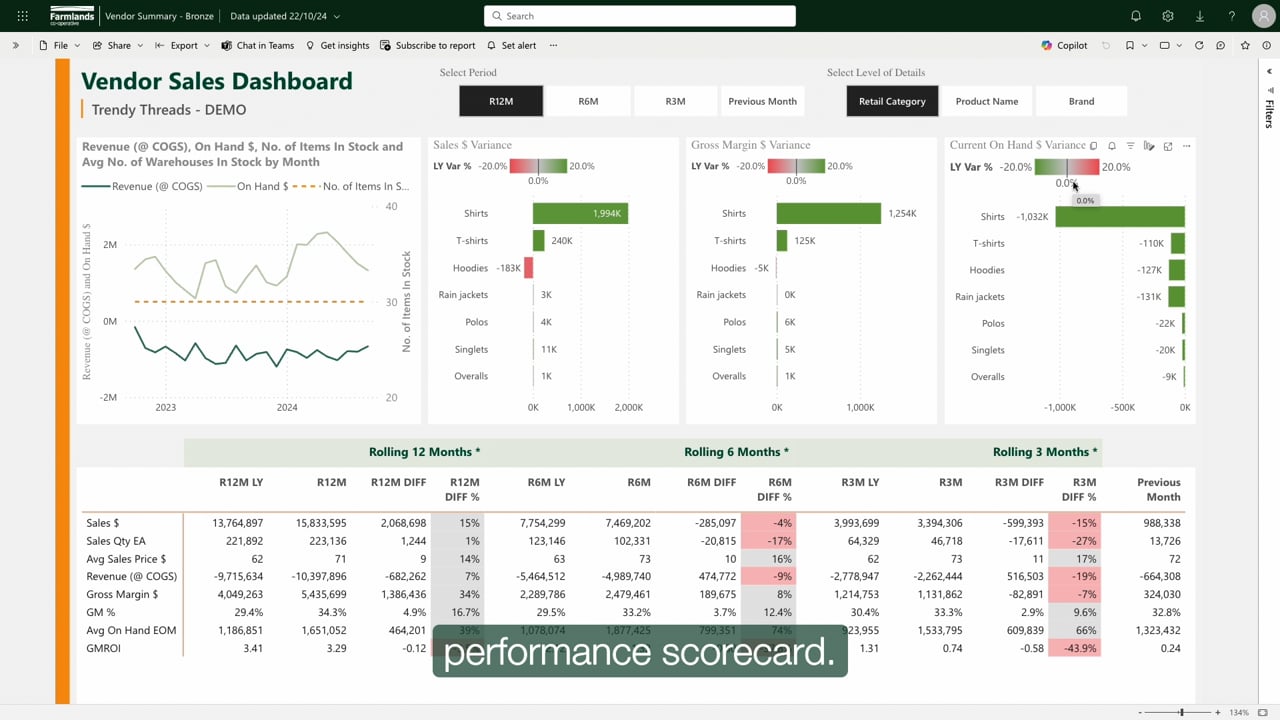
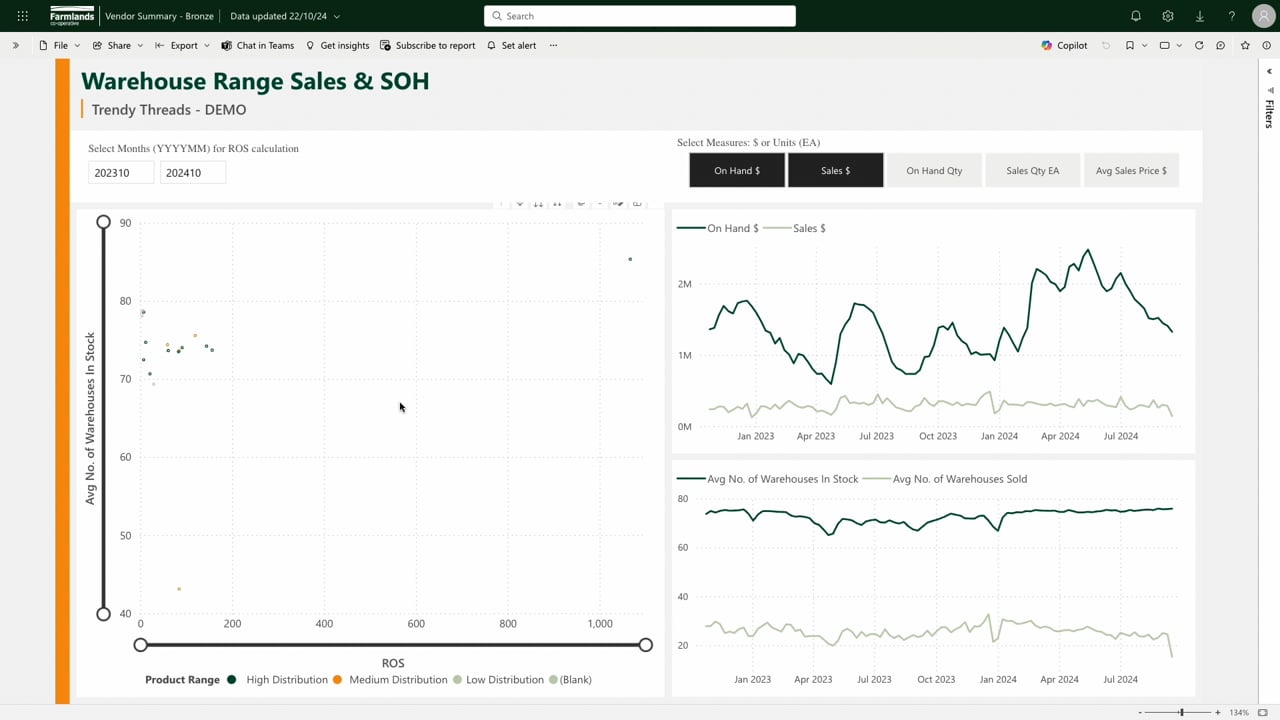
Vendor View gives you real-time visibility of how your products are performing across our 80+ stores. It's the data you need to make sharper decisions and have better conversations with your Farmlands Category Team.
See what's actually happening on the shelf:
- Real-time sales data and range performance
- Store-level insights across the Farmlands network
- The information you need to have better conversations with your Category Manager
What kind of data can you see?
- Product sales
- Product and range performance
- Sales trends
- Store-level performance
Getting started with Vendor View is easy
Pick your access option
Get in touch with your Category manager who will sort your access.
We'll walk you through it with simple how-to videos
Vendor View Support
Find how-to videos and answers to common questions — all in one place.